Guide
ChatGPT for tradesmen and trades businesses (UK)
Shaun Holmes
ChatGPT for trades businesses in the UK: quotes, messages, RAMS and invoices. AI tools for tradesmen and tradies, with a guide for each trade.
ChatGPT for trades businesses is a chat tool used on notes you already have. It turns them into a quote, a text, or an invoice. AI tools for tradesmen, and the same search written as AI tools for tradies, do that wording. They do not set the price.
A tradesman can open ChatGPT on a phone in the van and ask it to tidy a quote, a text to a customer, or the words on an invoice. That is a useful half hour if you already know the job. It is a mess if you ask it to invent the price, the hazards, or a promise you would not say out loud.
I've spent more than 20 years in UK construction. We search the AI world every week so you don't have to. This page is the practical version: the jobs I would actually use it for, a prompt for each, and the lines I delete before anything goes out. The free tools guide is the wider list. ChatGPT is the name most people type. Claude and Gemini do the same kind of wording. You open ChatGPT at chatgpt.com (opens in a new tab), Claude at claude.ai (opens in a new tab), and Gemini at gemini.google.com (opens in a new tab). I am not going to quote a price or a message cap. Those change, and each company's own site is the place to read them.
Use ChatGPT, Claude or Gemini to tidy the words. Do not use them to set a price, or to do a gas, electrical or structural calculation.
Each trade has its own page, in the list below. A voice note at the end of the day is voice notes to a site diary. If the job is an extension or a loft conversion waiting on planning, PlanAssist is the note on why I would not promise a decision date.
Last checked: 5 Nov 2026.
| Job | Use a chat tool for | Do not use it for |
|---|---|---|
| Quote, text, invoice, social post | The sentences, once you have typed the facts | The price, a measurement, or a promise you have not made |
| Gas | Nothing on the appliance or the pipework | The engineer's page is ChatGPT for gas engineers (UK). Gas Safe Register (opens in a new tab) says that, by law, anyone carrying out work on gas appliances and fittings as part of their business must be competent and on the register |
| Electrics | Nothing that sizes a cable or a circuit | That decision belongs to someone competent to do the electrical work. A chat tool is not that person |
| Structure | Nothing about whether a wall or a beam can come out | HSE (opens in a new tab) says the arrangements for demolition, dismantling or structural alteration must be written down before the work starts |
Guides for each trade
This page is the one for any trade. The pages below are the same jobs, written for one trade. Each one links back here.
- ChatGPT for builders (UK). Tender wording, a plain programme, variations, supplier chases, and snagging lists.
- ChatGPT for electricians (UK). Rewires, consumer units, EV charger quotes, a plain note on an EICR, materials, and invoices.
- ChatGPT for gas engineers (UK). Quotes, cover notes, updates, and invoice chases. The engineer keeps the safety decision.
- ChatGPT for joiners and carpenters (UK). Fitted-work quotes, cutting lists, and options emails.
- ChatGPT for painters and decorators (UK). Quotes, the finish they asked for, prep, and snagging lists.
- ChatGPT for plasterers and dryliners (UK). Skim, board and render quotes, a drying text, and variation notes.
- ChatGPT for plumbers (UK). Boiler and bathroom quotes, invoice chasers, and review replies.
- ChatGPT for roofers (UK). Quote wording from survey notes, weather updates, and repair or replace.
- ChatGPT for tilers (UK). Quotes with the square metres and the adhesive or grout allowance you already worked out, plus prep notes, job lists, invoices, and review replies.
Get it free every week
A weekly email on quotes, messages, and the other jobs people are asking a chat tool to do.
Quotes
The tool writes the sentences. You write the number. Do not ask it what a fair price is. It has not seen the walls, and it does not know what you need to earn.
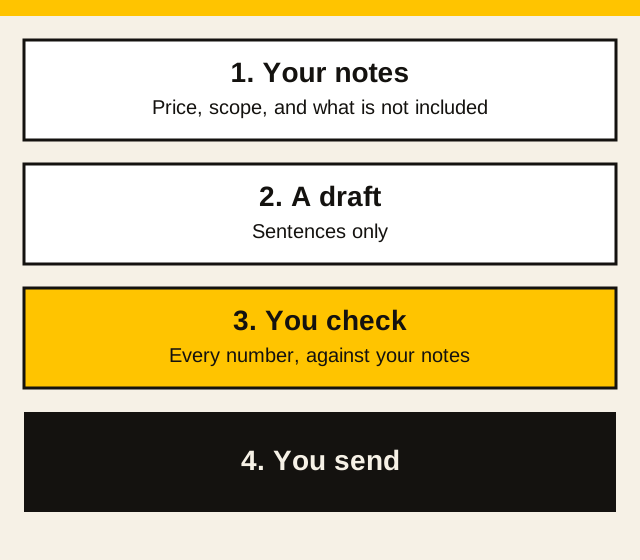
Walk the job first. Note the address, what they asked for, the measurements, who buys the materials, how long, and what is not included. Decide the price. Then paste the notes.
You are helping a UK tradesman write a quote. UK English. Use pounds.

Do not add rooms, measurements, materials, dates, or prices that are not in the notes. If something important is missing, write [still to confirm] and leave it blank.

Notes:
[paste your notes]

Price I have already decided: £[amount]
VAT: [not registered / included at 20% / added at 20%]

Write a short quote the customer can read on a phone. Put the price near the top. List what is not included. End by asking them to reply yes if they want the job booked.
Read every number against your notes before you send it. The longer version, with a worked example and separate prompts for a homeowner and a business customer, is AI for quoting jobs UK. That page also covers QuickPrice, Speak to Quote and Field Forge, and why you still set the number.
Customer messages
Most of the messages are small: you are running late, you need a photo of the boiler cupboard, you cannot do Thursday. Write them yourself if they are one line. Use the tool when you are irritated and the first draft would be rude, or when you need the same facts in a calmer order.
Rewrite this as a short text to a UK customer. Polite, plain, no jargon. Do not add a discount, a date, or an apology I did not write. Keep every fact that is already here.

Message:
[paste what you would have sent]
If the job is a scam text that looks like a customer, or a supplier, that is a different problem. The scam texts guide is the check before you tap a link. A bad Checkatrade or Google review is a different message again. The reply guide is the check before you post.
RAMS and method statements
A chat tool can put notes you already made under headings. It cannot decide how you will stop someone falling, and it has not seen the landing.
HSE's short guide (opens in a new tab) splits a risk assessment into five steps: identify the hazards, assess the risks, control the risks, record your findings, and review the controls. HSE's construction administration page (opens in a new tab) says method statements are not required by law for every task. They are still the usual way to plan higher-risk work and to tell people the precautions. The same page says the arrangements for demolition, dismantling, or structural alteration must be recorded in writing before the work begins.
Write the hazards and the controls yourself, from the visit. Then:
Turn these site notes into headings for a risk assessment and a short method statement. UK English. Keep my order. Do not add hazards, people, plant, or controls I did not write. If a precaution is missing, write [missing: what I will do] and stop.

Where on site: [notes]
Who else is around: [notes]
What I saw: [notes]
Order of work and the precaution for each step: [notes]
Delete any line you did not type. The RAMS guide is the longer version of what is all right to draft and what is not.
Invoices and chasers
GOV.UK says an invoice must include (opens in a new tab) a unique number, your name and address, the customer's name and address, a description, the supply date, the invoice date, the amount, VAT if it applies, and the total. If you are not VAT registered, do not let a draft add a VAT line.
Put your real bank details in the prompt. Do not ask the tool to invent them.
Draft a UK invoice from these notes. UK English. Do not invent prices, dates, quantities, addresses, or bank details. If something is missing, write [missing: what] and leave it blank.

Trading name: [name]
Customer: [name and address]
Work: [what you did]
Amount: £[amount]
VAT: [not registered / 20%]
Bank details: [the ones you actually use]
Invoice date: [date]
A chaser is the same idea. Give it the invoice number, the amount, and the date you sent it. Tell it not to threaten court unless you have already decided to say that. The invoice and late-payment guide covers the Late Payment Act for business customers, which is not the same as a householder.
The books are a different program from the chat window. These are accounting tools, not a place to paste a customer's card number. Whether a plan is accepted for Making Tax Digital is a question for HMRC's guide to choosing that software (opens in a new tab), which includes the software finder. HMRC last updated that page on 13 July 2026. I have not copied a subscription price. Open the supplier's page on the day you pay, and read whether the figure excludes or includes VAT.
| Software | What their own site says |
|---|---|
| FreeAgent (opens in a new tab) | Accounting software. FreeAgent says it is an HMRC-recognised way to keep records for Making Tax Digital for Income Tax. |
| Xero (opens in a new tab) | Accounting software. Xero's UK site says it is HMRC-recognised and that you can prepare for Making Tax Digital for Income Tax in Xero. |
| QuickBooks (opens in a new tab) | Accounting software for UK businesses. QuickBooks says the online product includes Making Tax Digital for Income Tax support. |
| Sage (opens in a new tab) | Accounting software for UK small businesses. Check the plan you want on HMRC's finder before you rely on it for a submission. |
The job itself, the diary and the quote, usually lives in job-management software rather than in the chat. Again, no prices here. Several of these pages are in US dollars, or they do not say whether UK VAT is included.
| Software | What their own site says |
|---|---|
| ServiceM8 (opens in a new tab) | Job management for contractors: the call, the schedule, the quote, the invoice and the payment. The prices on that page are in US dollars. |
| Tradify (opens in a new tab) | Job management for trades, including electricians, plumbers and gas engineers: enquiries, quotes, scheduling and invoices. |
| Jobber (opens in a new tab) | Software for home service businesses. The AI receptionist is an add-on in the same account. |
| Powered Now (opens in a new tab) | Job management built in the UK for plumbers, electricians, gas engineers and builders. Their page says the app covers quotes, invoices and the diary. |
| Fergus (opens in a new tab) | Job management for trades: quote, schedule and invoice. |
| YourTradebase (opens in a new tab) | An app made for trades: quotes, invoices, schedules and job sheets. |
Social posts
A post is optional. A finished job, a town, and a straight sentence are enough. Do not ask it to invent a review, a star rating, or a claim that you are the best in the county. You do not have a source for that, and neither does the tool.
Write a short social post for a UK tradesman. Plain English. No hashtags piled on. No claim that I am the cheapest, the fastest, or the best. Do not invent a customer quote.

Trade: [trade]
Town: [town]
What I finished: [one or two facts from the job]
Ask: [for example, message me if you want a quote]
If you would not say it on the doorstep, do not post it. Photos of the work belong to you. Do not upload a picture of the customer's face, or of paperwork with their address on it, unless they have agreed.
Safe use and GDPR
A customer's name, address, and phone number are personal data. So is a photo of their house if it identifies them. The ICO's guidance on AI and data protection (opens in a new tab) is the official page on how the data protection principles apply when you use AI. The ICO says that page was updated on 15 March 2023, and that it is under review because of the Data (Use and Access) Act. Read it there rather than trusting a summary that will go out of date.
For a normal quote or text, paste less, not more. A job name and the town is often enough. Leave out:
- card numbers, and one-time codes from texts
- your UTR, and a customer's bank details
- medical details, even if they explain why the customer wants the work done a certain way
- passwords, or a photo of a driving licence
The longer list, photos and drawings included, and the switches in ChatGPT, Gemini and Claude, is in what never to paste into ChatGPT.
Check the tool's own privacy settings on the day, on OpenAI's site, for whether chats are used to improve the model. That switch moves. The page linked above is where those steps are written out, from OpenAI's own help page.
You still read the draft. Once you send it, it is your sentence. The page on whether ChatGPT names UK tradespeople is a different question: what those answers cite, not how you draft a quote.
What this will not do
It will not measure a room, know if you are VAT registered, or remember that the customer wants the hall finished before a family party. It will not make a risk assessment true. It will not get you paid.
Use one job this week. A quote you were going to write anyway is the right size. The prompts above are the start. The guides linked from each section are the detail.
Common questions
Can ChatGPT price a job for me?
No. You type the price you have already decided. ChatGPT can turn your notes into a quote, a message, or an invoice. It does not know the walls, the day rate you need, or what you promised on site.
Where is the guide for my trade?
This page is for any trade. Builders, electricians, gas engineers, joiners, painters and decorators, plasterers, plumbers, roofers and tilers each have a page of their own, linked under Guides for each trade.
What do AI tools for tradesmen cover?
On this page it means a chat tool, ChatGPT, Claude or Gemini, used to tidy words you already wrote. People also type that search as AI tools for tradies. The tool does not set the price, and it does not do a gas, electrical or structural calculation.
What should I not paste in?
Card numbers, one-time codes from texts, your UTR, a customer's bank details, and a photo that shows a face or a house number. A town and the work is often enough for the draft. The guide on what never to paste into ChatGPT is the longer list, including the training switches. A customer's name and address are personal data. The ICO's AI and data protection guidance is the official page on that.
Will this write a RAMS I can hand over?
Only as a draft of notes you already made on site. HSE's rules on what to record, and what a method statement is for, are on the HSE site. The RAMS guide on this site is the longer version. Delete any control the draft added that you did not write.
Get it free every week
Free when you sign up: the UK Trades AI Prompt Pack, with prompts for quotes, chasing payment, tax admin, and customers.