Guide
What never to paste into ChatGPT (UK trades guide)
Shaun Holmes
Names, photos, drawings, bank details and passwords to keep out of ChatGPT, and the training switches in ChatGPT, Gemini and Claude.
A chat tool can turn rough notes into a message. It does not need the customer's life story to do it. The name, the phone number, a photo of the front door, and a drawing with the address on it are the usual things that get pasted, because they are already on the phone. They are also the things I leave out.
I've spent over 20 years in UK construction, and the habit is the same as a paper file in the van. The job sheet stays with me. The question I ask is the question, not the whole file. We search the AI world every week so you don't have to. The switches further down were read from OpenAI, Google, Anthropic and the ICO on 31 October 2026. If a screen has moved, follow the linked page. This guide will not guess a button it has not seen.
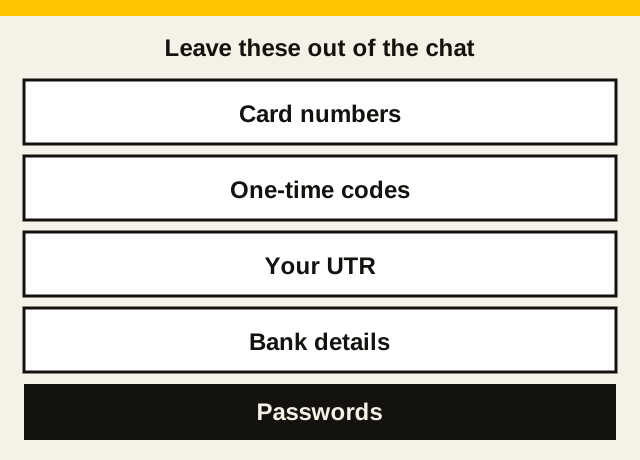
What never goes in the paste
These are the lines and files I do not put in ChatGPT, Gemini, Claude, or any other chat, even when I am in a hurry.
Names, addresses and phone numbers. A customer's name, address and phone number identify a living person. So does an email address. The ICO's glossary for small organisations (opens in a new tab) lists people's names and addresses as personal data, and it says a document or image is still personal data if it identifies someone, or could with other information, even when the name is missing. The ICO's advice for small organisations (opens in a new tab) gives phone numbers, email and postal addresses, and payment information as examples. The quote you send can carry the address. The chat does not need it. A town, or no place at all, is enough for the wording.
Photos with a house number or a face. The same glossary lists photographs. A face identifies a person. A house number, a street sign, or a van registration in the shot can identify the home once it sits next to anything else you typed. A close photo of blown plaster, with no person and no number, is a different picture. If you are not sure, do not upload it. Describe the wall in words.
Drawings and client documents. A plan, a specification, a contract, or a survey usually has a title block. That block is often the client's name, the site address, and a phone number. That is the same personal data as typing it. Cover the title block before you would even think about uploading, or do not upload the file. Type the question: the span, the material, the thing you are unsure of. Do not paste an invoice that shows a bank account, or a photo of a driving licence. Taking the address off the chat is not the same as signing the drawing. If a tool drafted it and you are going to issue it, who still checks it is who signs an AI drawing.
Bank details, a UTR, and a National Insurance number. Payment information is on the ICO's list of examples. The glossary's payroll example treats a National Insurance number and bank account details, linked to a named person, as personal data. A Unique Taxpayer Reference is an identification number. The ICO's guide to personal information (opens in a new tab) says the UK GDPR's list of identifiers includes a name, an identification number, and location data, and that the list is not exhaustive. Leave your UTR, your National Insurance number, a customer's bank details, and your own bank details out of the chat. The tax pages on this site, including the registration guide, are where those numbers belong, and they stay on HMRC's own service.
Passwords and one-time codes. A password, or a code from a bank text, unlocks an account. The chat cannot log in for you, and it does not need the code to draft a sentence. If you are checking a suspicious text, delete the code before you paste the rest. The scam text guide is that habit.
Health details are a separate category. The glossary lists data concerning health as special category data, and it says you only use that when it is absolutely necessary, and you take extra care. "The occupier is frail" does not go in the chat. "Occupier will be in the house; keep a clear route" says what the job needs.
Get it free every week
A weekly email on what to keep out of a chat tool, and the other paperwork that follows a job.
How to describe the job without the person
Write the note on the phone first. Then delete the identifying lines. Then open the chat.
- Take the name off. "The customer" is enough. A nickname that is still their name is not a deletion.
- Drop the house number, the street, the postcode and the phone number. Keep the town only if the question needs it.
- Leave the price, the rooms, what you saw, what you will do, and what you will not do. Those are the facts the draft is for. The quoting guide is the list to have ready.
- Do not upload the photo if it shows a face, a number, a street sign, or paperwork. Say what is wrong with the wall.
- On a drawing, do not upload the sheet until the title block is covered. If you cannot cover it, type the question and leave the file in your own email.
- Bank details, a UTR, a National Insurance number, a password and a one-time code stay out even after the name is gone.
You add the name and the address back in the email or text you send yourself. The chat never had them.
Taking the name off is not the same as making the note anonymous. The ICO's guide says information with identifiers removed or replaced, which it calls pseudonymised, is still personal data. Truly anonymous information is not covered by the UK GDPR. If you can still tell which customer this is, you have handed over less. You have not taken the job outside the law. The free tools guide is the same rule in shorter form: the tool is for sentences, and your own notes are for the facts.
The switches, on the providers' own pages
A switch is not a reason to paste the list above. It changes whether new chats are used to train a model. It does not make a bank detail harmless, and on the pages I read it does not delete what you already sent. Read the page on the day. These are the controls that were there on 31 October 2026.
ChatGPT
OpenAI's data controls page (opens in a new tab) says that on a personal workspace with ChatGPT Free, Plus or Pro, data sharing is on by default. You can turn off Improve the model for everyone and keep your chat history.
On the web, signed in: open your account menu, select Settings, select Data controls, select Improve the model for everyone, turn it off, and select Done. On iPhone and Android: open the sidebar, select your profile icon to open Settings, select Data controls, and turn off Improve the model for everyone. Signed in, that setting applies to the account on the web and on the phone. Signed out, the same page says you turn it off in Settings, and the choice is saved in that browser.
Turning it off does not delete chats, and it does not hide them. Regular chats stay in history. Archiving a chat does not change whether it can be used for training. The setting is what decides that.
Temporary chat is the separate option on that page. While a chat stays temporary, OpenAI says it does not appear in your history, it does not create or update memories, it is not used to improve OpenAI's models, and it may be kept for up to 30 days for safety. If you save it, it becomes a normal chat and follows your account settings. The page describes that. It does not, in the article I read, give a separate button-by-button path for starting one, so I am not going to invent the click.
Two limits, from the same page. If you send feedback, such as thumbs up or thumbs down, the whole conversation tied to that feedback may be used to train models even after you have opted out. Voice mode has its own control for training. I have not copied a voice-mode click path, because this page points you to the Privacy Portal for it rather than listing the taps. OpenAI also says some Trusted Access sessions on a personal account can still be used to improve models when Improve the model for everyone is off. If you are not in one of those sessions, the switch still applies to your other activity.
The same page says OpenAI does not, by default, use content from ChatGPT Business, Enterprise, Edu, or ChatGPT for Healthcare workspaces to train its models, and it does not use API inputs and outputs for training by default. The steps above are the personal Free, Plus and Pro control.
Gemini
Google's help page on Gemini Apps activity for a computer (opens in a new tab) is the path I read. Sign in at gemini.google.com, click Settings and help, then Activity. If you are 18 or over, Keep Activity is on by default. Near the top, choose Turn off, or Turn off and delete activity.
Turning it off does not mean Google immediately forgets the chat. The same page says that even with Keep Activity off, conversations are saved with your account for up to 72 hours so Google can provide the service and process feedback. That activity does not appear in Gemini Apps Activity.
The Gemini Apps Privacy Hub (opens in a new tab) says future chats are not used to train Google's AI models if Keep Activity is off, unless you choose to send feedback. It also says temporary chats are not used to train those models. I am not going to invent the taps for starting a temporary chat. The hub describes what they do, and the activity page above is the Keep Activity switch.
The hub is plain about what "off" does not mean. Even with Keep Activity off, or in a temporary chat, Google still uses the chats to answer you and to help protect Google, its users, and the public, including with help from human reviewers. Your Gemini settings do not control processing of chats to create anonymised data to improve Google services. If Keep Activity is on, the hub says not to enter confidential information you would not want a reviewer to see or Google to use to improve its services.
That computer page is for a personal account. If you use Gemini with a work or school account, it says your administrator controls the activity settings, and you may not be able to change how long chats are kept. The phone has its own help page. I read the computer one, so the clicks above are the computer clicks.
Claude
Anthropic's article on changing model improvement settings (opens in a new tab) is dated 3 August 2026. It covers consumer plans: Claude Free, Pro and Max, and Claude Code used from those plans. It points commercial plans, including Claude for Work and the API, to a different page. I have not set that commercial page out here.
On a computer: select your name in the settings menu, select Settings, select Privacy, and under Help Improve our AI models turn the switch off. On the phone: select your name, Settings, Privacy, and the same switch.
If you turn it off, Anthropic says it will not use new chats and coding sessions for future model training. It will also stop using your previously stored chats and coding sessions in future training runs. Data already in training that has started, and models already trained, stay as they are. The article does not describe a switch that deletes your chat history. I am not going to invent one.
Flagged conversations can still be used. The article says that if safety classifiers flag a conversation, it may still be used to improve internal trust and safety models, to detect harmful content, to enforce policies, or for safety research.
Anthropic's article on whether your data is used for model training (opens in a new tab), dated 16 March 2026, says the same three routes onto training: you allow it, a conversation is flagged for safety review, or you opt in some other way, such as a trusted tester programme. It also says incognito chats are not used to improve Claude, even if model improvement is on in privacy settings. The article says that. It does not list the taps to open an incognito chat, so those taps are not in this guide. Feedback from a thumbs up or thumbs down stores the whole related conversation for up to 5 years, and Anthropic says it may use that feedback to train models.
A short note if you are a sole trader
This is the duty in the ICO's own words, not a privacy notice you can copy onto a van.
The advice for small organisations (opens in a new tab) says data protection law applies to sole traders and people who work for themselves when they hold and use personal information in the usual course of business. Customer names and contact details are the example it gives. The glossary (opens in a new tab) says a sole trader can be the controller: you decide how the information is used, and you are responsible for protecting it. Household notes, such as a family address on the fridge, are the exception it describes. A customer's details, kept so you can do the job, are the business.
Processing includes sharing the information or passing it on. Pasting a customer's details into a chat is that. You need a lawful basis before you use personal data. The glossary lists six, and it says you pick the one that matches the purpose. Its contract example is a prospective client asking for a quote: you handle a certain amount of their information to provide it. This page does not pick a basis for you. You also tell people what you are doing with their information. The glossary calls that the right to be informed.
Data minimisation is the principle that matches the list above. The glossary says you limit what you collect to what you need. If you only need basic contact details to run your accounts, you do not ask for more. The same idea applies to the paste: if the room and the task will do, the phone number and the title block do not go in the chat. You keep personal data secure, and you do not use it for a purpose that is nothing to do with why you collected it. Those are the security and purpose principles on the same page.
The ICO's guidance on AI and data protection (opens in a new tab) was updated on 15 March 2023. That page, and the small-organisation pages linked here, say they are under review because of the Data (Use and Access) Act. Read them on the ICO site. The same small-organisation advice says the ICO cannot tell you if a particular platform is compliant, because it cannot check every product. You decide whether the tool is appropriate for how you plan to use it, including whether you can keep the data secure. The duty sits with the controller, which for your customers' details is you.
The ChatGPT for tradesmen guide is the practical jobs: quotes, messages, invoices. The site diary guide is the end-of-day voice note, with the same rule on addresses. The toolbox talk on using AI tools safely is the five-minute version you can read out. None of them replaces the ICO pages.
What this will not do
It will not make a pasted bank detail safe because a switch was off. It will not delete chats you have already sent. It will not choose your lawful basis, and it will not write your privacy notice. The screens will move. The pages linked above are the ones I read on 31 October 2026.
Use one real job this week. Write the note, take the name and the address off, and ask for the sentence. Put the address back in your own email, when you are ready to send it.
Common questions
Is it safe to put a customer's details in ChatGPT?
A name, an address and a phone number are personal data. The ICO says data protection law applies to a sole trader using that information for the business, and that pasting it on is sharing it. Leave them out when the draft does not need them. Turning off training does not delete the chat, and it does not make a bank detail or a password a sensible thing to paste.
How do I turn off ChatGPT training?
On a personal ChatGPT Free, Plus or Pro account, OpenAI's data controls page says open Settings, then Data controls, then turn off Improve the model for everyone. Your chats stay in history. Temporary chat is the separate option that does not appear in history and is not used to improve the models while it stays temporary. OpenAI says it may still be kept for up to 30 days for safety.
Do Gemini and Claude have a training switch?
Gemini's computer help page calls it Keep Activity. It is on by default if you are 18 or over. Turn it off from Settings and help, then Activity, on gemini.google.com. Google says future chats are then not used to train its AI models unless you send feedback, and they are still saved for 72 hours. Claude's consumer setting is Help Improve our AI models, under Settings, then Privacy. Anthropic's article on that is dated 3 August 2026. Turning it off stops new chats being used for future model training. It does not undo training that has already happened.
What should I paste instead?
The work, in words. The room, what you saw, what you will and will not do, and the price you have already decided. No house number, no face, no title block, no bank details, no UTR, no National Insurance number, and no password. Put the address back in the email you send yourself.
Get it free every week
Free when you sign up: the UK Trades AI Prompt Pack, with prompts for quotes, chasing payment, tax admin, and customers.