Guide
Voice notes to a site diary: dictate the day in the van (UK)
Shaun Holmes
Turn a van voice note into a site diary, a materials list and tomorrow's calls. UK trades prompts. You check every name, address and figure.
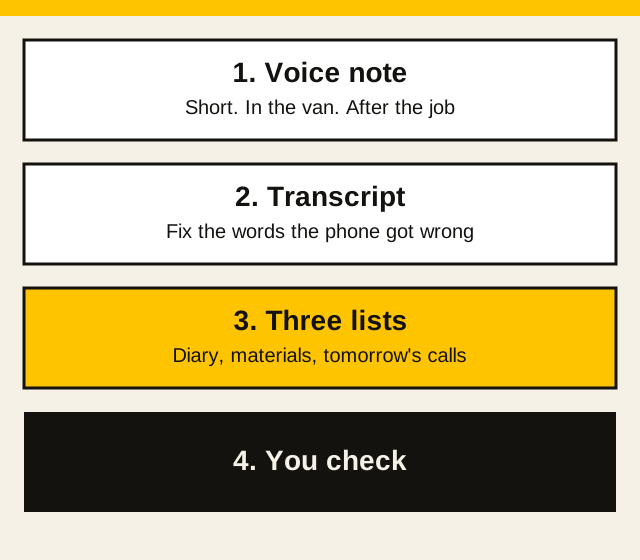
The useful version is a short voice note after the job, or at the end of the day in the van, before the details fall out of your head. You paste the transcript into ChatGPT, Claude, or Gemini. You ask for three things: today's diary entry, the materials to order, and the calls or emails for tomorrow. You check every name, address, and figure. Then you put the result somewhere you will actually open.
I've spent over 20 years in UK construction. I still want the day written down before I drive off. We search the AI world every week so you don't have to. The chat tool tidies the words. It does not know who you spoke to, what you counted, or what anything costs.
Last checked: 3 Nov 2026.
Record a short note
Use the voice memo on the phone, or the dictation key in a notes app. One job, or the whole day, not both mixed if you can help it. Talk in short lines:
- the name you use for the job, not the full address
- what you did
- what is left
- materials you still need, with quantities you have already counted
- who you need to call or email tomorrow, and why
- anything the customer changed, in their words as you remember them
Do not dictate a card number, a one-time code, a password, your UTR, or a bank detail. Do not dictate a client's personal detail you would not write in a paper diary in the van. A medical comment, a row with a neighbour, or a photo of a passport does not belong in either place.
If the phone's transcript has a wrong name or a wrong number, fix it before you paste. The tool will treat a bad transcript as a fact.
A town and the work is enough for the chat. Put the house number back in the diary you keep, yourself. The longer list of what to leave out, and the training switches, is what not to put into ChatGPT.
Get it free every week
A weekly email on site diaries, materials lists, and the calls for tomorrow.
The prompt for the three lists
Open a fresh chat for the day. Paste the transcript under the prompt. ChatGPT is at chatgpt.com (opens in a new tab), Claude at claude.ai (opens in a new tab), and Gemini at gemini.google.com (opens in a new tab). I am not copying a price or a message cap. Those change, and each company's own page is the place to read them. The wider list is the free tools guide.
You are helping a UK tradesperson turn a voice-note transcript into three lists. UK English.

Do not add jobs, names, addresses, materials, quantities, prices, or dates that are not in the transcript. Do not invent a price. If a name, address, quantity, or figure is unclear, write [check this] and leave it blank.

Transcript:
[paste the transcript after you have corrected it]

Write three sections:
1. Today's diary entry. Short lines a person can read tomorrow.
2. Materials to order. Only items I mentioned. If a quantity is missing, write [quantity].
3. Calls and emails for tomorrow. Who, and why, in one line each. If I did not name a person, write [name].
Read section 1 against what you remember of the day. Read section 2 against what you counted. Read section 3 and delete any person you did not name. If a price has appeared, take it out. You set prices. The quoting guide is the next step when a line in the diary is actually a quote you still have to send.
If you have an area and you want a count before you fill a [quantity], the calculators on the tools page do that sum from figures you type. They do not order anything, and they do not set a price.
End of day: tomorrow's materials and calls
Same habit, aimed at the morning. This one does not try to write the whole diary. It is the shutdown list: what to order before you leave, who to speak to, and what was left unfinished.
Turn this end-of-day voice note into tomorrow's list. UK English.

Do not add jobs, materials, quantities, prices, or phone numbers that are not in the note. Do not invent a price.

Note:
[paste]

Write:
- Materials to order before I leave in the morning
- Calls and emails to make tomorrow
- Anything left unfinished on site

If a quantity or a name is missing, write [check this].
Put a real date on the materials, in the calendar you already use, once you have checked the list. The reminders guide is that setup. The chat will not nag you at 7am. The phone will, if the event is in the calendar.
If the unfinished line is extra work the customer has not agreed, do not start it off the back of this list. The variation note is the message, with a figure you have decided, and a yes before you start.
If the note is really about who still owes you, or how thin the next few weeks look, this page is the wrong tool for the money. The winter cash-flow guide is the forecast. You still type the figures from your own records.
One job, as you pull away
When the day was a single visit, you do not need three headings. You need a diary line you will understand next week, plus anything you said you would order or chase.
Turn this voice note into a diary line for one job. UK English. One short paragraph, then any materials I named, then anyone I said I would contact.

Do not add rooms, measurements, prices, or names that are not in the note. If a quantity is missing, write [quantity].

Job name I use: [job name]
Note:
[paste]
Where the diary should live
Copy the checked text into the place you already keep the day: a paper diary, a notes app you pin, or the job system you already pay for. The chat is a bad filing cabinet. Threads get long, and you will not find Thursday's note in a month.
Two copies, the chat and the diary, means you will trust the wrong one. The diary you open in the morning is the one that counts. Delete nothing from that diary just because the draft looked neater. If the draft dropped a name, the diary keeps your line.
What not to paste in
Leave these out of the voice note and out of the paste:
- a full address, when a job name and a town will do for the draft
- card numbers, one-time codes, bank details, and your UTR
- a customer's medical detail, or a row that names a neighbour
- a photo of a certificate or a drawing if the name and address are in the shot
What not to put into ChatGPT is the longer check, including how to turn training off on the consumer accounts. Turning a switch off does not make a bank detail a sensible thing to dictate.
What this will not do
It will not remember the day if you do not record it. It will not count the boards. It will not price an extra. It will not send the emails, order the materials, or know that a name in the transcript is the wrong Steve. It will not replace the diary you actually look at.
Use it on the next job you were going to write up anyway. One note. Three lists. You check them. Then you close the chat.
Common questions
Can I paste a customer's address into the diary prompt?
Leave it out of the chat when a job name and a town will do. Put the house number back in the diary you keep. Do not dictate a personal detail you would not write in a paper diary in the van. The guide on what never to paste into ChatGPT is the longer list.
Will the tool order the materials or set a price?
No. It lists only the materials and quantities you already said. If a quantity is missing it should leave a blank. You check every figure. It does not order anything, and it does not invent a price.
Where should the diary live?
In the paper diary, notes app, or job system you already open in the morning. The chat is where the draft is tidied. It is a poor place to leave the only copy.
Get it free every week
Free when you sign up: the UK Trades AI Prompt Pack, with prompts for quotes, chasing payment, tax admin, and customers.